Someone is speaking. Right now. In a language you don’t understand.
You can’t pause them. You can’t ask them to slow down. And by the time you’ve figured out what they said, the conversation has moved on.
This happens in meetings, live events, webinars, and classrooms every single day.
Real-time caption translation solves it. Not after the fact. Not with a transcript you read later. Right now, as the words are being spoken.
This blog breaks down what it is, why it matters, and how we’ve built it into Fliter.ai to work instantly, accurately, and for free.
What Is Real-Time Caption Translation?
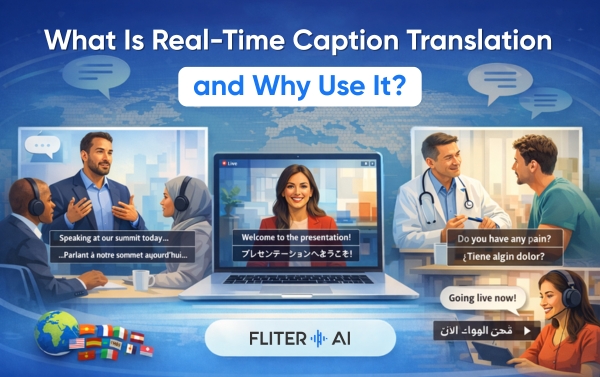
It’s the live conversion of spoken words into translated text – displayed on screen as speech happens.
Someone speaks in English. Captions appear in French. Or Japanese. Or Arabic. Instantly.
No delay. No switching between apps. No waiting for a recording to finish.
The difference between this and regular captioning is the translation layer. Standard captions transcribe speech in the same language. Real-time caption translation goes one step further – it converts what’s said into another language, live as it happens.
That’s what makes it genuinely useful for global communication.
Who actually needs this technology?
More people than you’d think.
- Global teams: meeting daily across time zones and languages, trying to collaborate without a shared native tongue.
- Event organisers: running conferences, summits, or webinars where the audience speaks multiple languages.
- Educators: teaching students who aren’t native speakers of the instruction language.
- Content creators: going live on YouTube or streaming platforms with international audiences.
- Healthcare providers: communicating with patients in real time across language barriers.
- Customer-facing teams: handling live support or sales calls with international clients.
According to Ethnologue, over 7,000 languages are spoken worldwide today. The need to bridge them – live, in the moment – has never been greater.
Why “Real-Time” Is the Key Word Here?
Delayed translation has always existed. You record something, send it off, wait for a translation, and publish it later.
That works for documents and pre-recorded videos. It doesn’t work for anything live.
Real-time caption translation removes the wait entirely. The value is in the immediacy – understanding what’s being said while it’s being said, not an hour later.
That changes everything for live communication. Meetings become productive. Events become inclusive. Conversations become two-way instead of one-sided.
How Fliter.ai’s Instant Caption Translator Works?
Our Live Captioning tool is the quickest to start. No account, no upfront payment.
Here’s how simple it is.
Step 1: Open the tool.
Go to our Live Captioning page. Click start. Choose your language. That’s it – you’re live.
Step 2: Speak.
Speech is captured, and captions are generated in real time. Our AI converts words instantly.
Step 3: Edit and export.
Use our interactive text editor to proofread and adjust if needed. Then export your captions in the format you need.
Three steps. Zero friction. It works in your browser – no downloads or plugins.
What Makes Ours Different?
1. Your Data Never Leaves Your Browser
This is something we’re proud of and something most tools won’t tell you about themselves.
When you use Fliter.ai’s Live Captioning, your data is never stored on our servers. It stays in your browser. What you say stays with you.
That matters for privacy. It matters for compliance. And it matters for trust.
2. 125+ Languages – Live
Most tools offer a few languages. We support 125+.
Spanish. Mandarin. Arabic. Hindi. French. Japanese. Portuguese. Swahili. And over a hundred more.
Whatever your audience speaks – we’ve got them covered. In real time.
3. Works With the Platforms You Already Use
You shouldn’t have to change how you work to get captions.
Our instant caption translator integrates directly with Zoom, Microsoft Teams, Google Meet, and YouTube Live. Set it up once. Use it everywhere you already meet, present, and broadcast.
4. Free – No Sign Up Needed
Start captioning now. No account, credit card, or trial required.
We offer free real-time caption translation because we believe accessibility shouldn’t have a paywall.
5. Edit What the AI Gets Wrong
Fliter.ai’s AI is highly accurate, but perfection isn’t guaranteed.
That’s why we built an interactive text editor directly into the platform. If something isn’t right, you fix it on the spot – before you export, share, or publish.
6. Beyond Live Captioning – What Else Can You Do?
Live captioning is where the conversation starts. But Fliter.ai goes further.
7. Auto Subtitle Generator
Already have a recorded video? Our subtitle generator automatically produces accurate multilingual subtitles in 125+ languages. Same accuracy. Same speed. For content that’s already been recorded.
8. Voice Cloning in 29 Languages
Want your voice to speak another language? Our voice cloning feature clones your voice and lets it speak in 29 different languages. Your words. Your voice. Any language.
9. AI Dubbing With Real Dialects
Our AI Video Dubber goes beyond generic voiceovers. It offers a portfolio of AI speakers with different dialects and accents – so your dubbed content sounds local, not just translated.
10. YouTube Integration
If you’re a creator, our YouTube integration lets you fetch content directly from your channel – no file uploading one by one. Edit subtitles. Add translations. Publish – all from inside Fliter.ai.
11. Team Collaboration
Running a team? Create shared channels with view and edit permissions. Your whole team can collaborate on captions, voiceovers, and translations – in real time, together.
12. The Accessibility Argument
We’ve talked about business use cases. But there’s something bigger here.
Real-time caption translation isn’t just a productivity tool. It’s an inclusion tool.
Hearing-impaired individuals rely on captions to access spoken content. Non-native speakers rely on translation to participate fully. People who process information better visually rely on text to follow along.
Our Live Captioning tool serves all three groups simultaneously with one solution.
When you add real-time caption translation to your meetings and events, you’re not just removing a language barrier. You’re making a statement about who belongs in the room.
According to the World Federation of the Deaf, there are approximately 70 million deaf people worldwide. That’s an audience that is too often excluded from live spoken content. Captions change that.
Why Are Teams Switching to Fliter.ai for Live Captioning?
Old approach – hire a human stenographer or interpreter for every live event. Expensive. Hard to scale. Not available for every language.
New approach — open Filter.ai, click start, and get live-translated captions in 125+ languages. Free. Instant. Available anywhere.
The switch isn’t complicated. The difference is immediate.
And because our tool runs in the browser – with no data stored on our servers – it’s also one of the most secure options available.
Final Thoughts
Live communication is the most human thing we do.
It deserves tools that keep up with it – not tools that make you wait.
Real-time caption translation means no one in the room is left behind. Every language is heard. Every voice is understood. Every meeting moves forward.
That’s what we built Fliter.ai’s instant caption translator to do.
Start captioning for free right now, no sign-up required. And if you want to talk through how it fits your workflow, contact us. We’re happy to help.
Frequently Asked Questions
Q1: What is real-time caption translation?
Ans. The live conversion of spoken words into translated text – displayed on screen as speech happens, in a different language, with no delay.
Q2: Is Fliter.ai’s instant caption translator really free?
Ans. Yes. You can start generating live captions right now – no account, no sign up, no payment required.
Q3: Is my audio stored on Fliter.ai’s servers?
Ans. No. Your data never leaves your browser. Nothing is stored on our servers during live captioning – keeping your conversations private and secure.
Q4: Which platforms does it work with?
Ans. Fliter.ai integrates with Zoom, Microsoft Teams, Google Meet, and YouTube Live – with no complicated setup.
Q5: How many languages does real-time caption translation support?
Ans. 125+ languages – covering every major global market and many regional ones too.
Q6: Can I edit captions if the AI makes a mistake?
Ans. Yes. Our built-in interactive text editor lets you proofread and fix anything before you export or publish.